How to Change Your Lock Screen Background Image in Windows 8 and Windows 8.1
 Information
In Windows 8 and 8.1 there are two "Lock" screens.
This tutorial will show you how to change the lock screen background image for your user account to be any image you would like when you lock the PC while signed in to Windows 8 and Windows 8.1.
If you are using a Microsoft account and have the Personalize setting turned on to sync, then the lock screen background you currently have set will also be displayed on any PC that you sign in to with the same Microsoft account.
- The user lock screen is the one that displays when a user locks the PC while still signed in to Windows, and when the user is selected on the sign in screen, times out, and returns to the lock screen. Each user is able to change their lock screen background image to an image of their choice.
- The default Lock screen image is the one that displays when there are no users currently signed in to Windows or selected on the sign in screen.
This tutorial will show you how to change the lock screen background image for your user account to be any image you would like when you lock the PC while signed in to Windows 8 and Windows 8.1.
If you are using a Microsoft account and have the Personalize setting turned on to sync, then the lock screen background you currently have set will also be displayed on any PC that you sign in to with the same Microsoft account.
 Note
NoteThe default background images used for the lock screen are located in the Screen folder below. If you delete any of the default image in the Screen folder below, you will no longer see recent background images under the current lock screen image.
C:\Windows\Web\Screen
C:\Windows\Web\Screen
 Tip
TipWhen you use choose to use a custom image for your lock screen instead of one of the default images, Windows will save this image in the hidden system LockScreen_(letter) folder location below to open it from. This way if you should lose your original image, you could get a copy of it from here.
Here's how to be able to open it and view the image if needed:
NOTE: You must be signed in as an administrator to be able to do this.
1. You will need to take ownership (option four at link) of the hidden SystemData folder with "Administrators" or your user account, and check the Replace owner of subcontainers and objects box.

2. Open the SystemData folder, and open the S-1-5-21-.....(long number) folder for the user account that set this custom lock screen image. Each user account on the PC that uses a custom lock screen image will have it's own S-1-5-21-.....(long number) folder, so you may need to go in each one to find yours.
3. Open the ReadOnly folder, then open and look in each LockScreen_(letter) folder for the custom image. Each time you choose a custom image, a new LockScreen_(letter) folder is created in alphabetical order for each image.
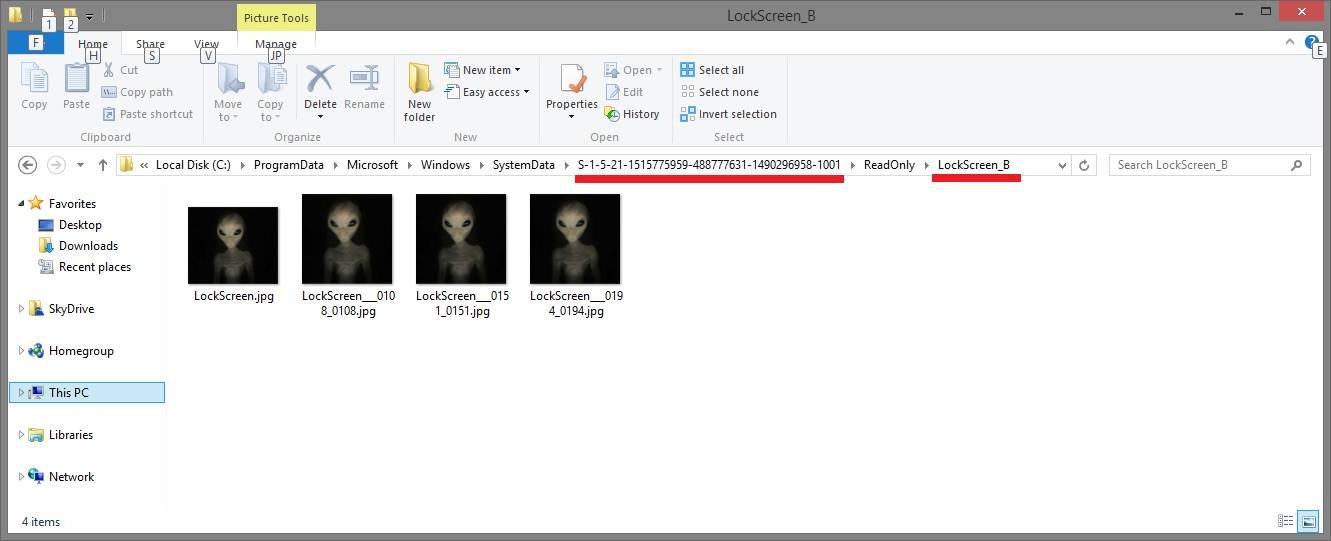
Code:
C:\ProgramData\Microsoft\Windows\[B]SystemData[/B]\[COLOR=#ff0000][B]S-1-5-21...[/B][/COLOR]\ReadOnly\[B]LockScreen_[COLOR=#ff0000](letter)[/COLOR][/B]Here's how to be able to open it and view the image if needed:
NOTE: You must be signed in as an administrator to be able to do this.
1. You will need to take ownership (option four at link) of the hidden SystemData folder with "Administrators" or your user account, and check the Replace owner of subcontainers and objects box.
2. Open the SystemData folder, and open the S-1-5-21-.....(long number) folder for the user account that set this custom lock screen image. Each user account on the PC that uses a custom lock screen image will have it's own S-1-5-21-.....(long number) folder, so you may need to go in each one to find yours.
3. Open the ReadOnly folder, then open and look in each LockScreen_(letter) folder for the custom image. Each time you choose a custom image, a new LockScreen_(letter) folder is created in alphabetical order for each image.
EXAMPLE: Lock Screen

OPTION ONE
Change Lock Screen Background Image using "PC settings" in Windows 8
1. Open PC settings.
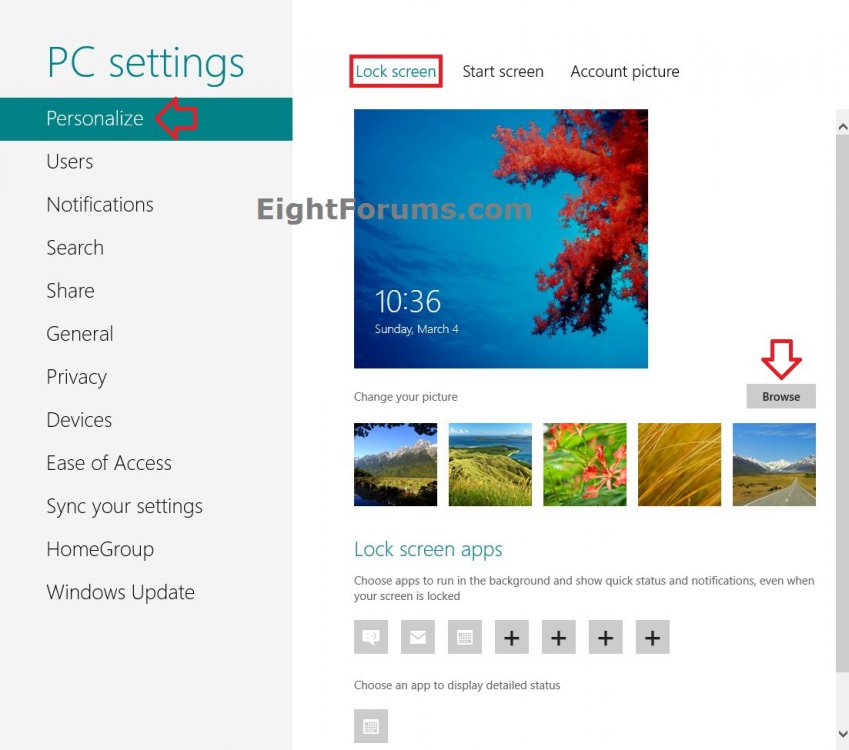
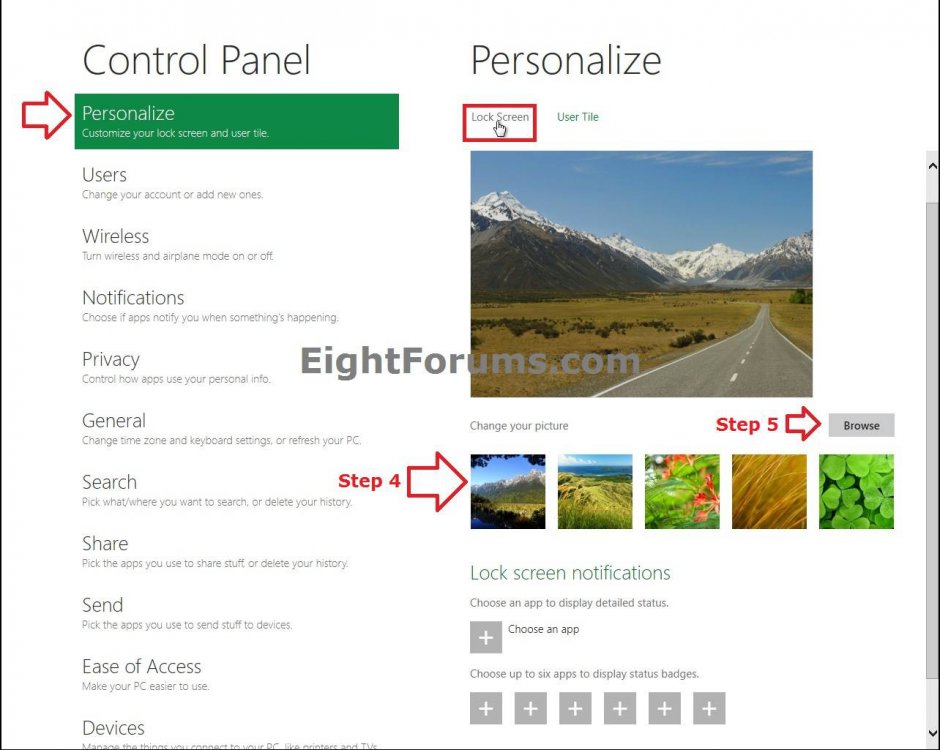
2. In the left pane, click/tap on Personalize, then click/tap on the Lock screen option if not already selected. (see screenshots below)
3. Do step 4 or 5 below for what image you would like to use on the lock screen.
4. To Select a Default or Previously Used Image as Lock Screen Background
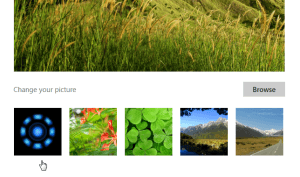
A) Click/tap on one of the 5 images to select it, and go to step 6 below. (see screenshot below step 2)
TipTo Restore Default Images under "Change you picture"
Right click or press and hold on one of the images, and click/tap on Revert to defaults.

Right click or press and hold on one of the images, and click/tap on Revert to defaults.
5. To Choose an Image as Lock Screen Background
A) Click/tap on the Browse button. (see screenshot below step 2)
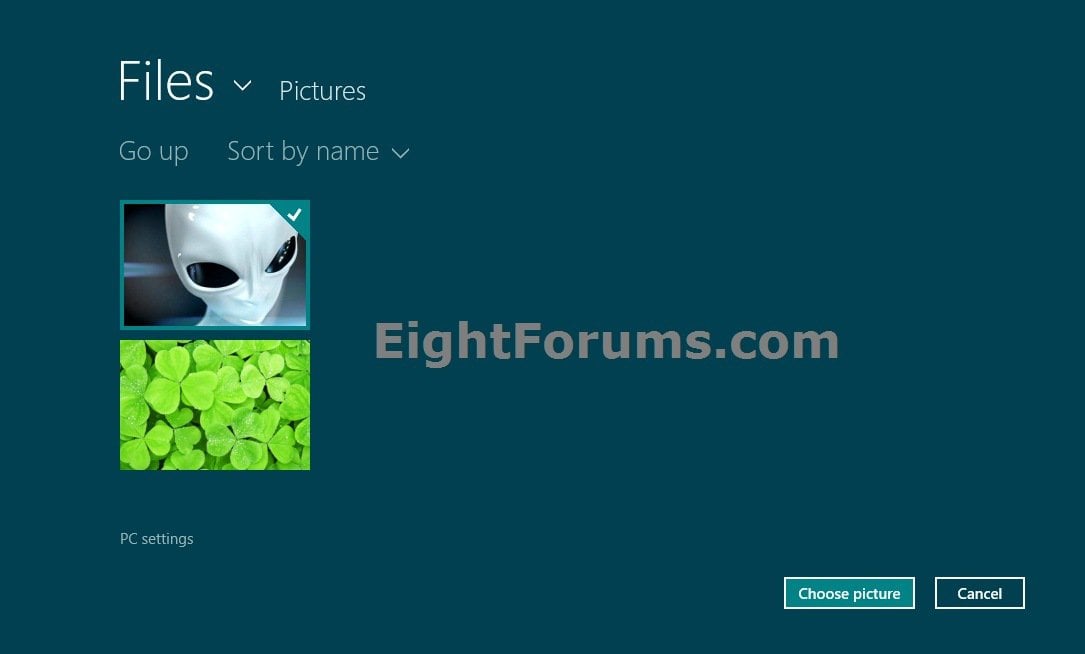
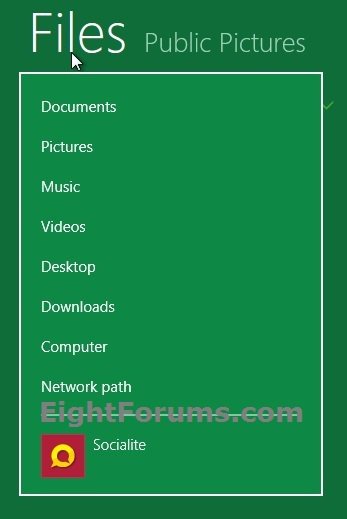
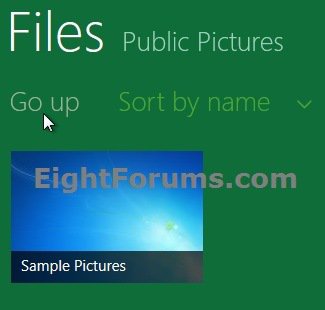
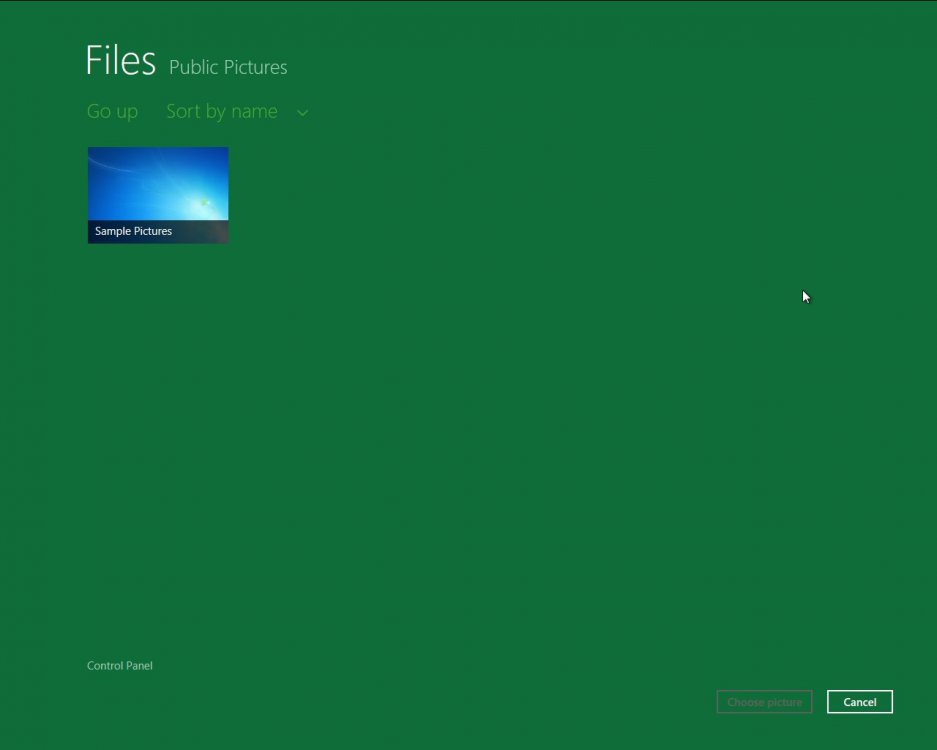
B) Navigate to and select the folder that contains the image you want to select. (see screenshot below)
TipHow to Navigate:
Tip
A) Click/tap on Files to open a root folder to have it's subfolders open in the main window.
B) Click/tap on a folder in the main window to open it's subfolders in the main window.
C) During this, you can click/tap on Go up to go up one folder level in the main window.
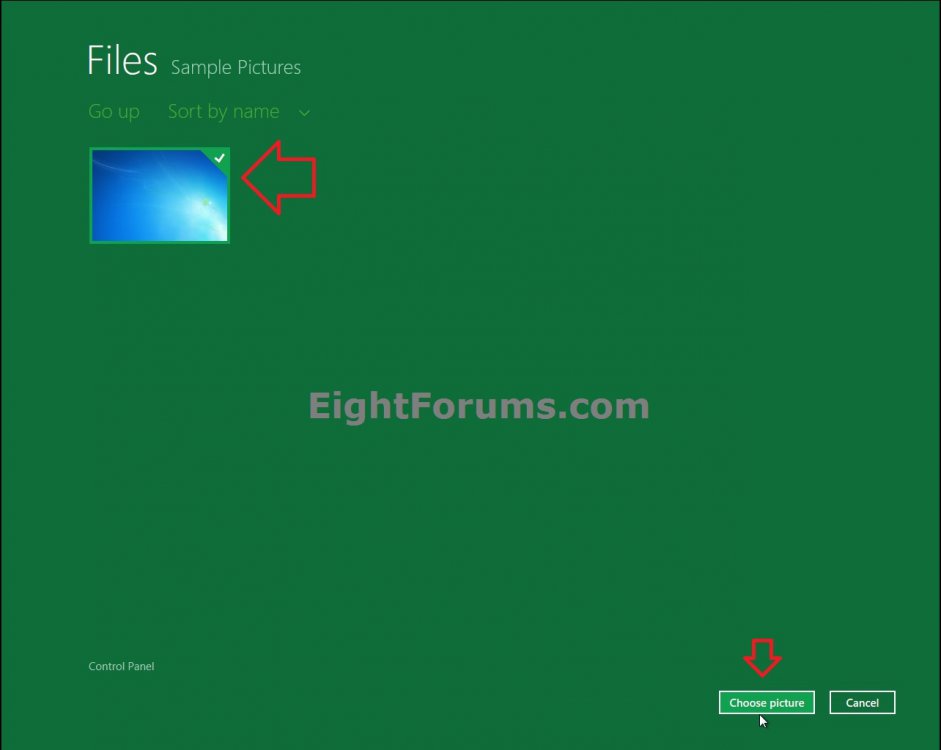
C) Open the folder that contains the image, select the image by clicking/tapping on it, click/tap on the Choose picture button at the bottom right corner, and go to step 6 below. (see screenshot below 5B)
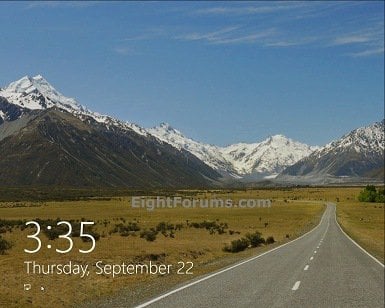
6. The image will now be set as the background on your lock screen. If you like, lock your PC to see your new lock screen background. (see screenshot below)
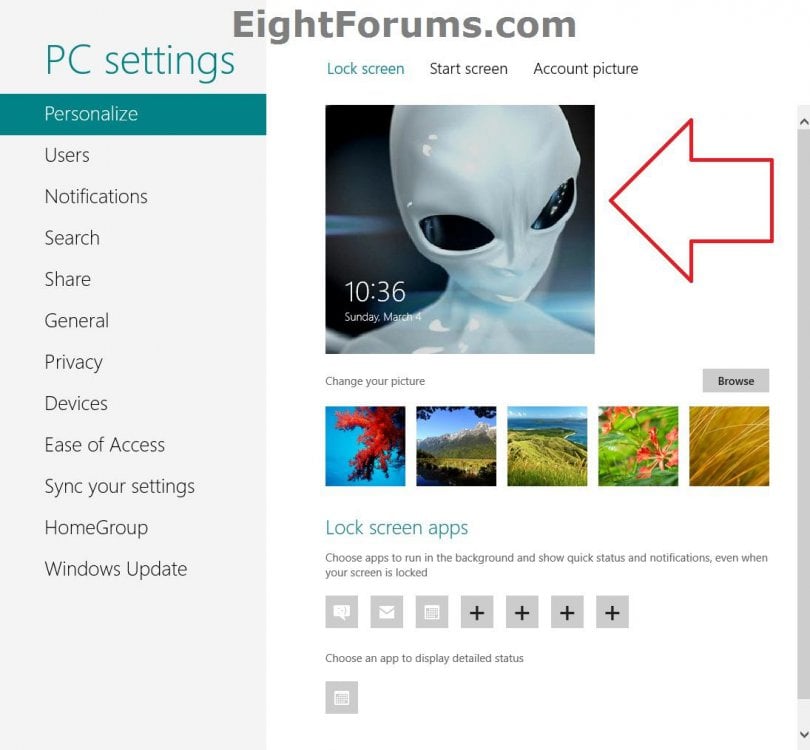
7. When finished, you can close PC settings if you like.
OPTION TWO
Change Lock Screen Background Image using "PC settings" in Windows 8.1
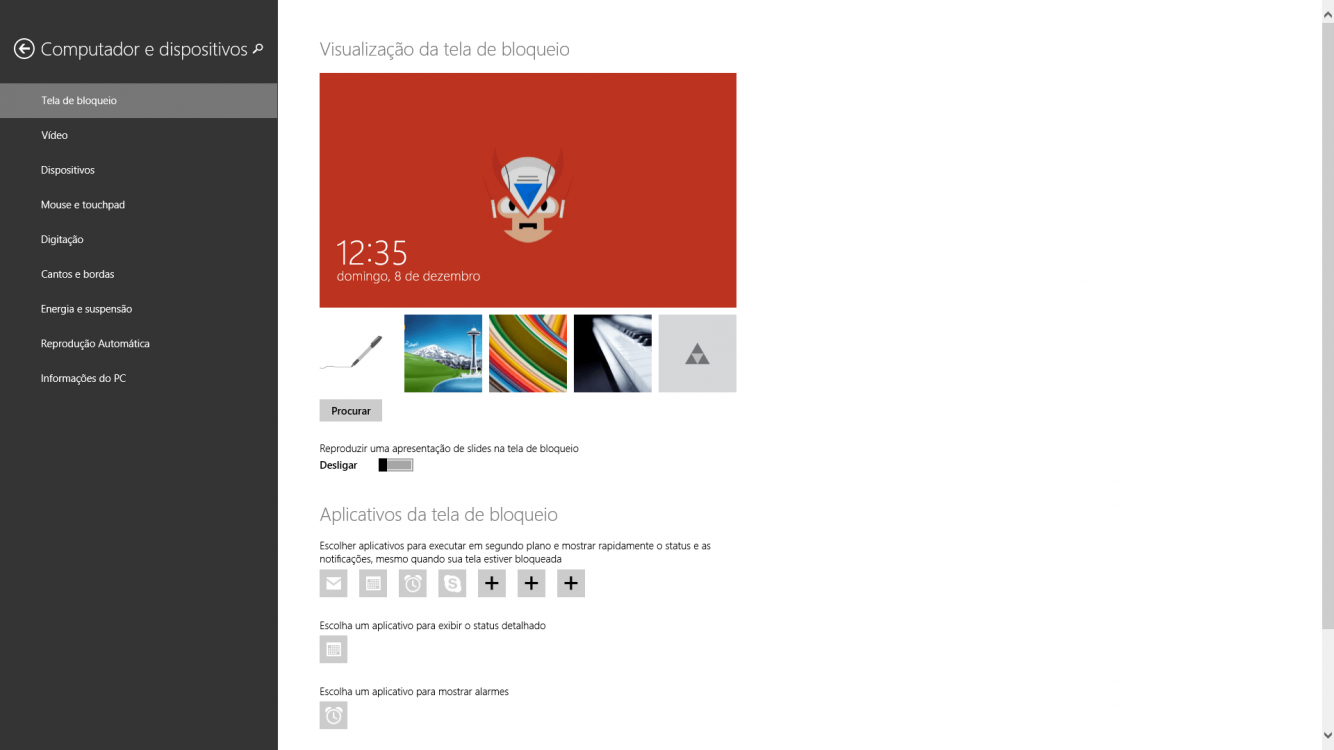
1. Open PC settings, and either click/tap on Lock screen on the right side or click/tap on PC & devices on the left side. (see screenshot below)
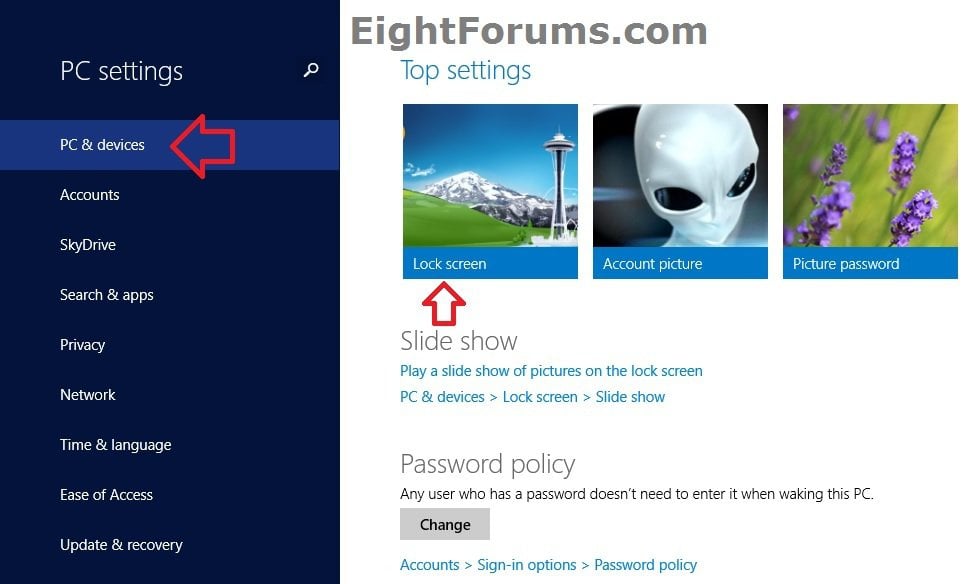
2. Click/tap on Lock screen on the left side of PC & devices, and do step 3 or 4 below for what you would like to do. (see screenshot below)
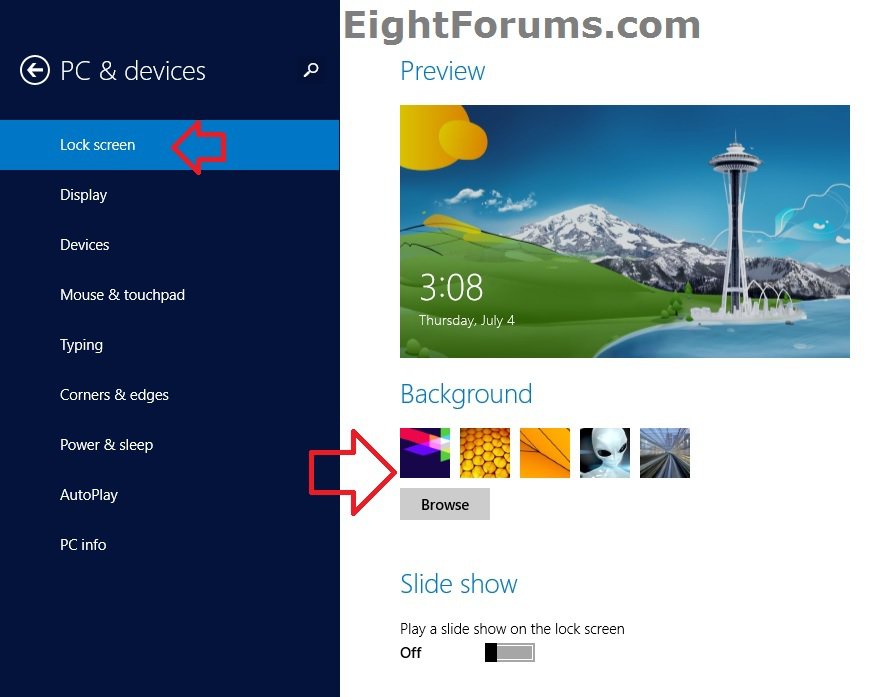
3. To Select a Default or Previously Used Image as Lock Screen Background
A) On the right side under Background, click/tap on one of the five images that had been previously chosen as the lock screen background, and go to step 5 below. (see screenshot below step 2)
4. To Choose an Image as Lock Screen Background
A) On the right side under Background, click/tap on the Browse button. (see screenshot below step 2)
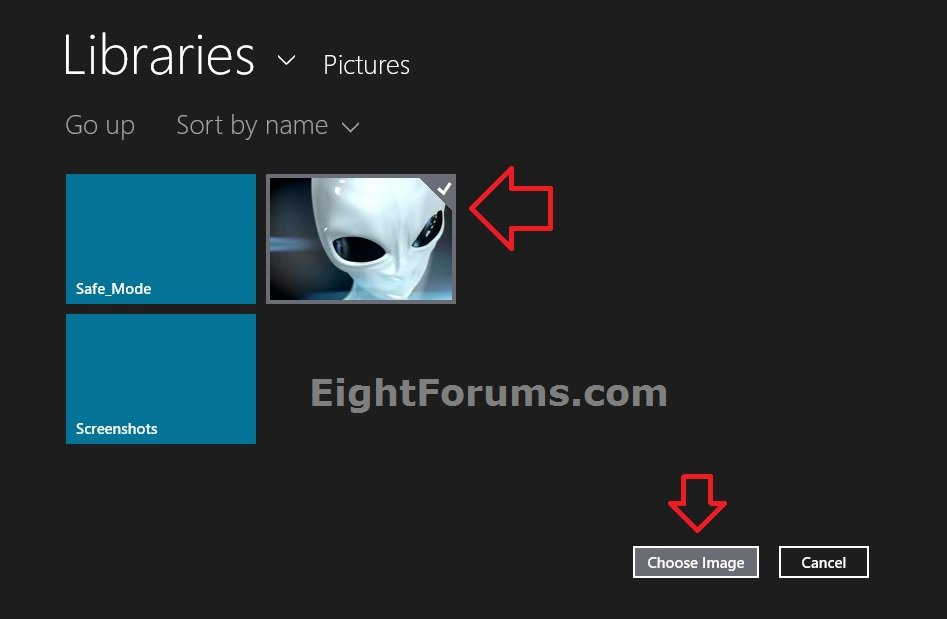
B) Navigate to and open the folder that contains the image you want to select. (see screenshot below)
TipHow to Navigate:
Tip
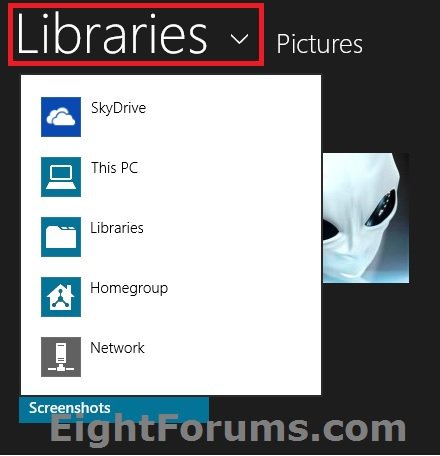
A) Click/tap on This PC or Libraries to open a root folder to have it's subfolders open in the main window.
B) Click/tap on a folder in the main window to open it's subfolders in the main window.
C) During this, you can click/tap on Go up to go up one folder level in the main window.
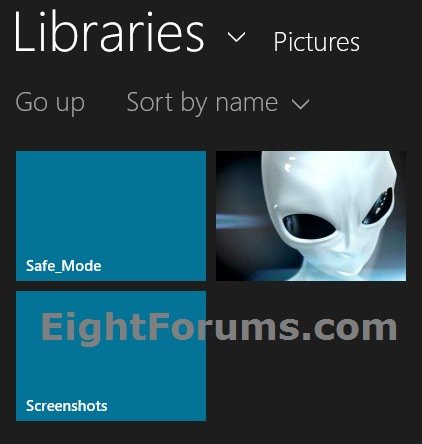
C) Open the folder that contains the image, select the image by clicking/tapping on it, click/tap on the Choose image button at the bottom right corner, and go to step 5 below. (see screenshot below 4B)
5. The image will now be set as the background on your lock screen. If you like, lock your PC to see your new lock screen background. (see screenshot below)

6. When finished, you can close PC settings if you like.
OPTION THREE
Change Lock Screen Background Image Using "Photos" App
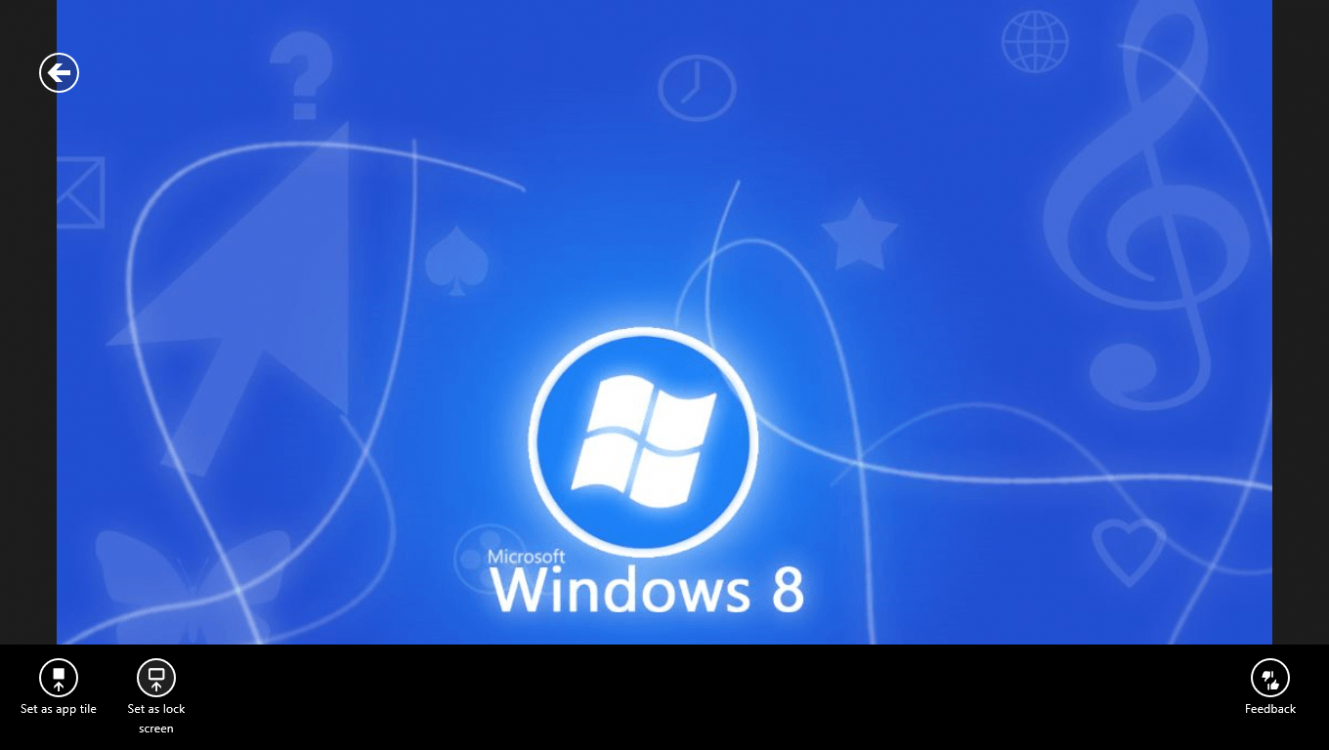
1. Open an image that you want as the lock screen background with the Photos app. (see screenshot below)
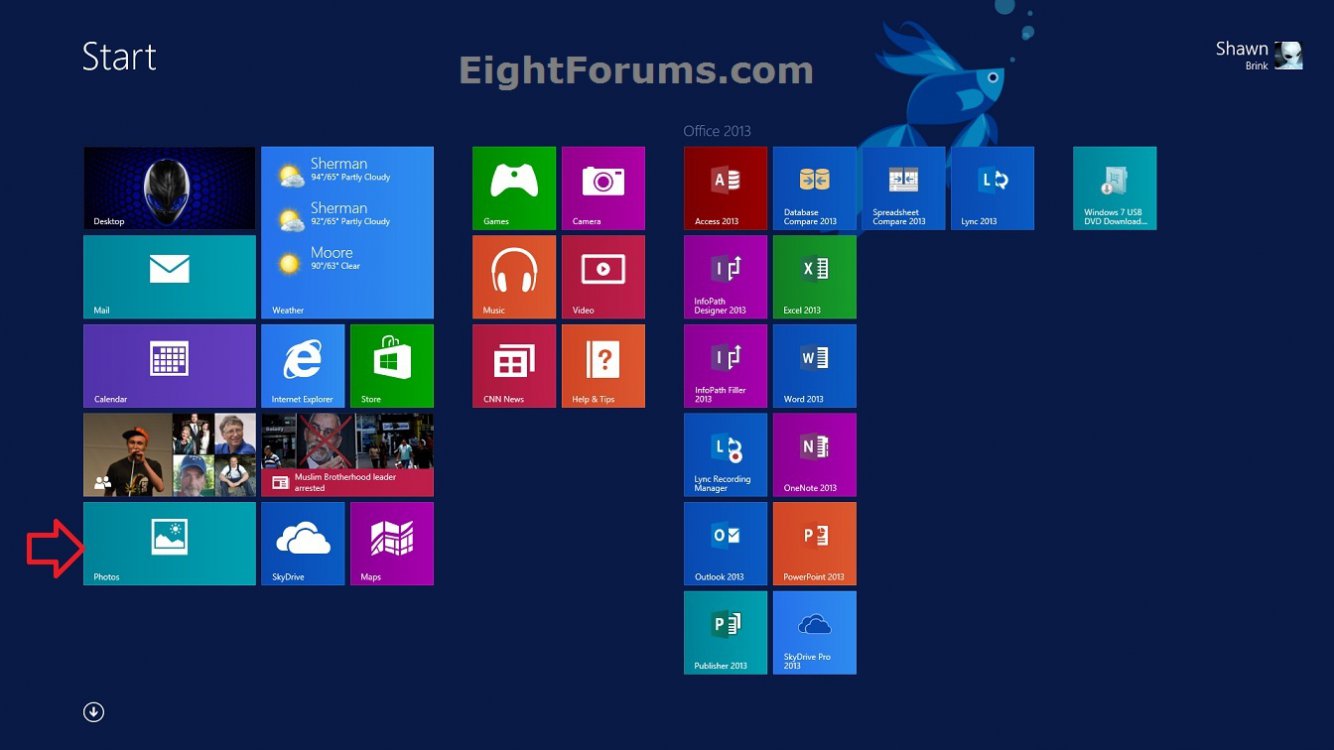
2. Either swipe up from the bottom of your touch screen or right click on the image in the Photos app to open the options bar at the bottom, then click/tap on Set as and the Lock screen option. (see screenshot below)
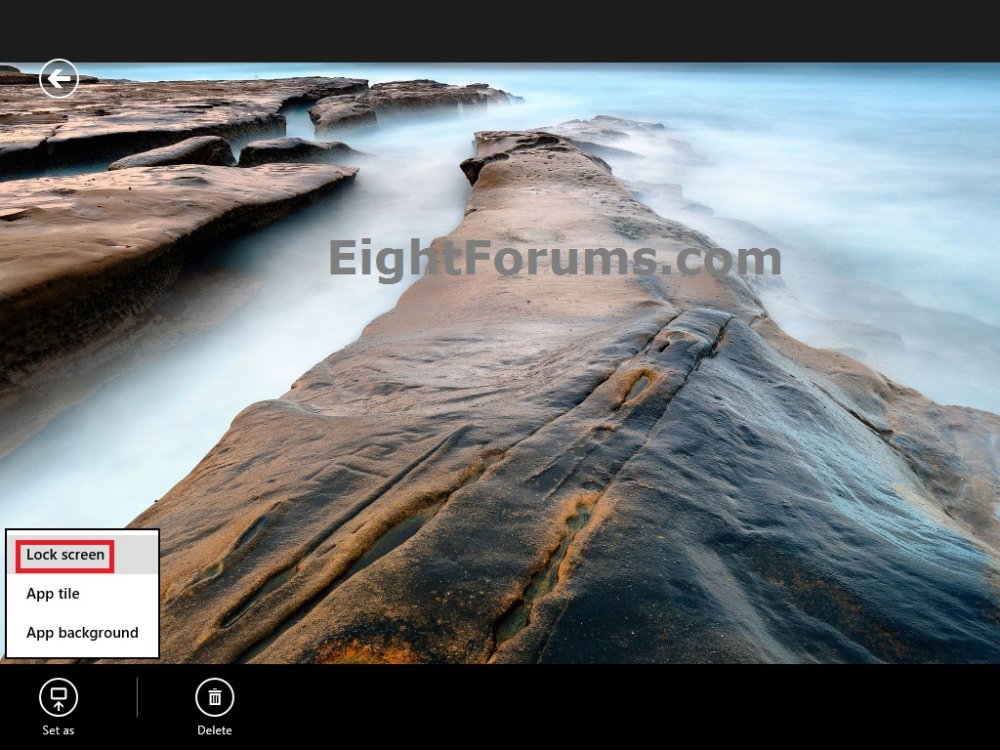
3. The image will now be set as the background on your lock screen. If you like, lock your PC to see your new lock screen background.
That's it,
Shawn
Related Tutorials
- How to Change the Default Lock Screen Background Image in Windows 8 and 8.1
- How to Set a Default Lock Screen Background Image for All Users in Windows 8 and 8.1
- How to Turn On or Off the Lock Screen Slide Show in Windows 8.1
- Change Your Start and Sign in Screen Background and Color in Windows 8 and Windows 8.1
- How to Change Your Desktop Background and Slide Show in Windows 8 and Windows 8.1
- How to Sign in to Windows 8
- How to Enable or Disable the Lock Screen in Windows 8
- How to Enable or Disable Changing the Lock Screen Background Image in Windows 8
- How to Change the Lock Screen Timeout Period in Windows 8
- Set Desktop, Lock, and Start Background to Show Image or Solid Color in Windows 8 and 8.1
- How to Enable or Disable Using Camera on Your Lock Screen in Windows 8.1
- How to Create a "Lock Screen" PC Settings Shortcut in Windows 8.1
- How to Change Lock Screen Clock Time Format in Windows 8 and 8.1
- How to Change Lock Screen Clock Date Language in Windows 8 and 8.1
Attachments

Last edited by a moderator: