Join Date : Feb 2011
bangalore
Posts : 515
Windows 8 professional x64 + WMC
Windows 8 to Have a PDF Reader Out Of the Box
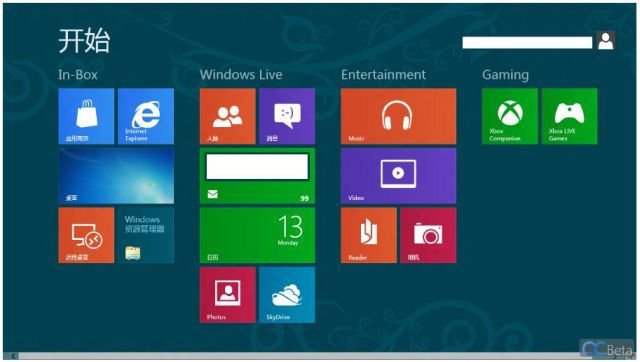
Gone are the days when we used to download the Adobe Reader to open up the PDF files on our Windows XP,Vista or even windows 7 for that matter. Come Windows 8 we won’t be needing any installations for the Adobe reader after a fresh Windows 8 installation,according to newly leaked screenshots of Windows 8 showing up the start screen UI along with a number of Metro Apps courtesy PCBeta shows up the Reader app and according to the claims the Reader app can be used to open the PDF files.
System Manufacturer/Model Number Acer Aspire 5920 OS Windows 8 professional x64 + WMC CPU Core 2 duo T5550 Motherboard ACER CHAPALA Memory 4GB DDR2 Graphics Card Intel GMA X3100 Screen Resolution 1280 X 800
Computer Type PC/Desktop System Manufacturer/Model Number My Build OS Windows 8 Pro x64 & Windows Blue 9374 x86 & Longhorn 4074 x86 CPU QX9770 @ 4.00 GHz Motherboard P5W-DH Deluxe Extreme Edition Memory DDR2: G.Skill 8GB @ 1000 MHz (5-5-5-17) Graphics Card Sapphire HD7950 3GB @ 1075 / 6400 MHz Sound Card Realtek ALC882 7.1 HDA Monitor(s) Displays LCD: Proview 22 " + LG 18.5" Screen Resolution 1680 x 1050 / 1280 x 1024
Keyboard Microsoft Wireless Keyboard Mouse Microsoft Wireless Mouse PSU ThermalTake 1000W PSU Case Self-Modded Cooling Corsair H60 (Dual Fan) Hard Drives 1 x 256 GB SSD (System)
1 x 750 GB HDD (Media)
1 x 1000 GB HDD (Storage) Internet Speed 25 Mbps (Down) 5 Mbps (Up) Browser IE, FF, Chrome, Opera Antivirus Avast
System Manufacturer/Model Number n/a OS Windows 7 Ultimate SP1 (64 bit), Windows XP SP3, Linux Mint 14 MATE (64 bit) CPU AMD Phenom II x6 1055T, 2.8 GHz Motherboard ASRock 880GMH-LE/USB3 Memory 8GB DDR3 1333 G-Skill Ares F3-1333C9D-8GAO (4GB x 2) Graphics Card ATI Radeon HD6450 Sound Card Realtek? Monitor(s) Displays Samsung S23B350 Screen Resolution 1920x1080
Mouse Wired Optical Case Tower Hard Drives WD Green 1 TB (SATA), WD Green 1.5 TB (SATA), WD Green 2 TB (SATA) Other Info Ubuntu 10.04 (64 bit) replaced with Linux Mint 14 MATE (64 bit) - 2013-01-14
RAM & Graphics Card Upgraded - 2013-01-13
Monitor Upgraded - 2012-04-20
System Upgraded - 2011-05-21, 2010-07-14
HDD Upgraded - 2010-08-11, 2011-08-24
I know it's an older thread, but I had the misfortune of seeing how the metro pdf reader behaves. There aren't enough cuss words to fling at this app. I had to install the normal pdf reader. Who in their right mind would use the app pdf reader on a desktop. When you're reading or working with a pdf you usually have other multitasking things going on. Trying to do that with the stupid pdf app is just plain dumb. That was definitely only built with a tablet or phone in mind.
I got fed-up with acrobat reader wanting to update every time on the rare occasion I did want to use it and having to take readersl out of startup every time it did, so have been using chrome ass my default pdf reader for over a year now. It says that it can't display all functions properly (or something like that) but I have never had any problems.
metro pdf is pretty much pointless on a desktop system.
Computer Type PC/Desktop System Manufacturer/Model Number Self build OS win8 pro CPU Intel core i7 3930k @ 4.17GHz Motherboard Asus p9x79 pro Memory 4x4GB Corsair Vengeance LP xmp quad channelled Graphics Card EVGA GTX660 ti, Signiture 2, FTW 2GB GDDR5 Sound Card Onboard Realtek 7.1 Monitor(s) Displays 32" Samsung tv, 21" Dell monitor both 1080 native Screen Resolution 1920x1080 x2
Keyboard Microsoft comfort curve Mouse Anker 8000dpi 1000m/s precision gaming mouse PSU Tagan tg-800-bz 800w modular Case Icute mesh with 280mm side fan Cooling Corsair H80 (2x120mm push and pull) Hard Drives Samsung 830 256gb sata3 ssd, 4x250gb sata2 hdd RAID_0, 3tb ZyXEL NSA-310 (nas). Internet Speed 10MB Other Info Logitech 5.1 with phantom channels. xbox 360 pad for windows.
Gone are the days when we used to download the Adobe Reader to open up the PDF files on our Windows XP,Vista or even windows 7 for that matter. Come Windows 8 we won’t be needing any installations for the Adobe reader after a fresh Windows 8 installation,according to newly leaked screenshots of Windows 8 showing up the start screen UI along with a number of Metro Apps courtesy PCBeta shows up the Reader app and according to the claims the Reader app can be used to open the PDF files.
Hi there
applaud your effort - but Windows 8 ALREADY has a PDF reader -- although it's one of those HORRIBLE full screen metro apps -- I rarely use this type of stuff in Full screen mode on a PC since I'm often comparing documents or copying pieces from several documents when making a presentation.
I'll stick with adobe or foxit or one of the other "traditional desktop" pdf readers.
The metro app is fine for tablets etc but not traditional desktops - especially if you are using large external monitors as well.
However how do you CLOSE this wretched app after enabling snap right or snap left. -- I had to get into Task manager and close it that way !!!
That's what happened to me which prompted my post. I killed it in task manager and uninstalled the app. And then downloaded the non-metro version.
Originally Posted by jimbo45
Originally Posted by bagavan
Gone are the days when we used to download the Adobe Reader to open up the PDF files on our Windows XP,Vista or even windows 7 for that matter. Come Windows 8 we won’t be needing any installations for the Adobe reader after a fresh Windows 8 installation,according to newly leaked screenshots of Windows 8 showing up the start screen UI along with a number of Metro Apps courtesy PCBeta shows up the Reader app and according to the claims the Reader app can be used to open the PDF files.
Hi there
applaud your effort - but Windows 8 ALREADY has a PDF reader -- although it's one of those HORRIBLE full screen metro apps -- I rarely use this type of stuff in Full screen mode on a PC since I'm often comparing documents or copying pieces from several documents when making a presentation.
I'll stick with adobe or foxit or one of the other "traditional desktop" pdf readers.
The metro app is fine for tablets etc but not traditional desktops - especially if you are using large external monitors as well.
However how do you CLOSE this wretched app after enabling snap right or snap left. -- I had to get into Task manager and close it that way !!!
Join Date : Sep 2012
North Yorkshire
Posts : 52
Windows 8 Pro 64 bit
PDF out of the box? Well it may have been but certainly not for long. It was well and truly put back in the box before 15 minutes had passed and 2 crashes.
No thanks, I'll stay with Nitro.
System Manufacturer/Model Number pcspecialists. Fusion450 OS Windows 8 Pro 64 bit CPU AMD FX(tm)-4100 Quad-Core. 3.60GHz. Motherboard ASUS Memory 4GB Graphics Card AMD Radeon HD7700 series
The metro app is fine for tablets etc but not traditional desktops - especially if you are using large external monitors as well.
However how do you CLOSE this wretched app after enabling snap right or snap left. -- I had to get into Task manager and close it that way !!!
Just because your usage makes full-screen superfluous it doesn't mean the app is not fine for 'traditional desktops.' Also, FTR, you close a Modern UI app that's been snapped the same way you would if it was full screen. Just click at the top and drag it down.