Join Date : Aug 2009
Posts : 9,518
WCP / Win.7 Ultimate 64-bit SP1.
Windows 8 Metro Apps Need Close Buttons Too
Early adopters that have played with the first public preview Build of Windows 8, whether on the Samsung Windows Developer Preview PC or their own test machine, have undoubtedly tried to close a Metro application, and found out that it’s not as easy as it seems.
System Manufacturer/Model Number LAPTOP. HP Pavilion dv7-4010TX . OS WCP / Win.7 Ultimate 64-bit SP1. CPU Intel i7 -720QM.[1.6GHz Turbo Boost 2.8GHz. 6MB Cache.] Memory 8 DDR 3 RAM. 1066MHZ Graphics Card ATI 1024 MB. DDR3. Radeon HD5650 Monitor(s) Displays 17.3" High Definition Brightview LCD. LED Backlit. Screen Resolution 1600 x 900.
Keyboard Does the keyboardless Laptop exist? Mouse Logitech Anywhere mouse. MX. Case Laptop / notebook. Cooling Of course.Cooler Master 3 fan with various speeds. Hard Drives 640GB Internet Speed Too slow. Other Info Nunya...
System Manufacturer/Model Number H.A.L. 2000 OS Win 7 Ult X64 SP1 Memory 8GB GSkill ripjaws 7-8-7-24T, PC12800 Graphics Card ASUS GTX460 Sound Card Realtech onboard Monitor(s) Displays Samsung P2570HD Screen Resolution 1920X1080
Keyboard some old Dell I found Mouse Logitch M215 PSU Corsair HX650W Case Raidmax Smilodon Cooling 120mm X2 case fans, 120mm CPU cooler fan Hard Drives Crucial M4 64GB, Samsung 500GB SATAII Internet Speed eh, 6-18Mbs down, 3-5Mbs up Other Info LG Bluray burner, floppy drive (yes floppy drive)DVD/RW, 9-in-one card reader
OS Windows 8 DP CPU Intel i5 750 Motherboard Asus Maximus III Formula Memory G.Skill Ripjaws 4x2Gb Graphics Card Asus GTX 560 CU Monitor(s) Displays Acer G235H Screen Resolution 1920x1080
Keyboard Logitech K300 Mouse Razer Salmosa Korean Tournament Ed PSU Corsair GS600 Case Powerlogic Cooling Noctua NH-C14 Hard Drives WD 320GB Black Caviar
WD 1TB Green Caviar Internet Speed 3MBps Other Info This is my legacy
Join Date : Sep 2011
Posts : 22
Windows 7/Windows 8
Thats because they don't realize that they don't have to close them, average users who use ipads, and smart phones will be right at home. But power users well new concepts are hard for them to grasp.
I don't think we need close button. This is the response from Microsoft tech
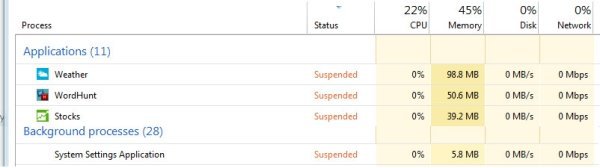
Apps go into a suspended mode when you switch to a new app. Here's how it works. When you switch away from an app it is given 5 seconds to perform any cleanup work (like saving settings or its state) and then is suspended. It is still in memory but not receiving any CPU cycles. If the system needs to free resources it will terminate suspended apps to make those resources available.
Let’s say you have 10 suspended apps and your App History is set to 3. If resources are needed, the 7 oldest apps will be evaluated to determine which one is using the most resources. It will be terminated. The only app(s) that are running, rather than suspended or terminated, are the ones you are actively using.
Join Date : Mar 2010
Birmingham
Posts : 259
W8 64bit
Originally Posted by logicearth
Thats because they don't realize that they don't have to close them, average users who use ipads, and smart phones will be right at home. But power users well new concepts are hard for them to grasp.
I agree with you, I like the idea of me not closing and let the PC do the job for me, when I leave the metro applications they go to suspend mode and don't use any resources, what's wrong with that? I don't get it.
Join Date : Sep 2011
Posts : 101
Black Label 7x64 and 8 CP
Originally Posted by logicearth
Thats because they don't realize that they don't have to close them, average users who use ipads, and smart phones will be right at home. But power users well new concepts are hard for them to grasp.
Join Date : Oct 2010
N. Calif
Posts : 29
Win 7 Home Premium (64-bit), Win 7 Pro (32-bit), Win 8 Consumer Preview (32 & 64-bit)
It's a paradigm shift. It took me awhile to adjust to it with my Android phone but now it doesn't bother me in the least. Once people get used to the apps being suspended and the OS deciding when to actually terminate the app it won't be a big forum topic anymore.
System Manufacturer/Model Number Dell XPS 8100 Desktop, Dell Inspiron 1520 Laptop OS Win 7 Home Premium (64-bit), Win 7 Pro (32-bit), Win 8 Consumer Preview (32 & 64-bit) CPU 2.8Ghz Core i7 860, 2,4Ghz Core 2 Duo Motherboard Dell, Dell Memory 8G, 3G Graphics Card ATI Radeon HD 5770, Mobile Intel 965 Sound Card ATI High Definition Audio (Built-in to mobo) Monitor(s) Displays Dell 2409W 24" Screen Resolution 1920x1080
Keyboard IBM Model M - used continuously since 1986 Mouse Microsoft Hard Drives 1T OS; 1.5T Data on Desktop, 320G for laptop Internet Speed 1.5M down 300K up :-( Other Info Also have 3 Acer Aspire netbooks, a home-built AMD Dual core, home-built Pent 4 and a Pent 3 all running Win 7 Pro 32-bit. Also have various machines running XP, Linux and DOS. I think I have a problem...