


- Messages
- 1,458
- Location
- A Finnish ex-pat in Leipzig, Germany
Every time computer is restarted, the weather gadget shows temps in Fahrenheit, although I have very clearly set it to Celsius.
This is what I can see when booted:
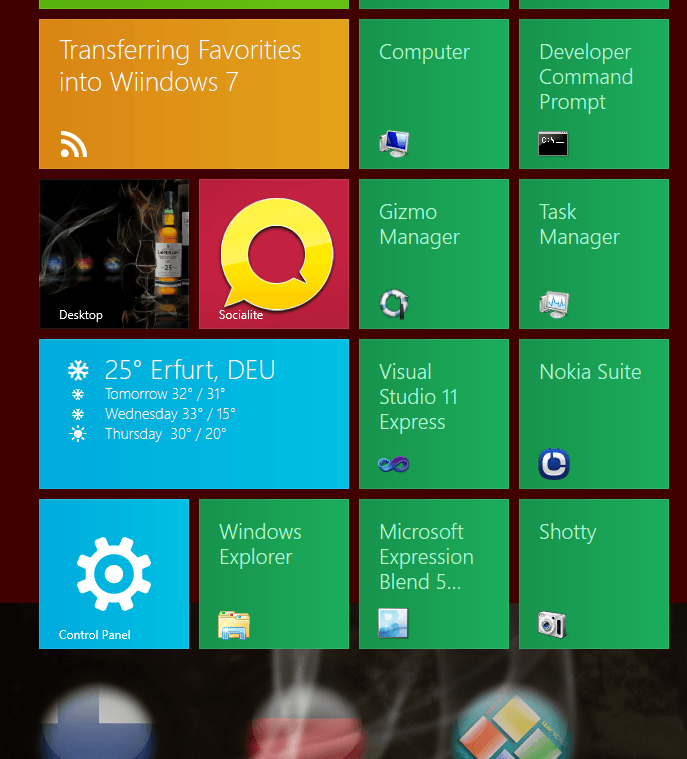
That temperature is in Fahrenheit.
I click the Metro gadget to enter Weather, and system immediately changes to Celsius, showing my locations:
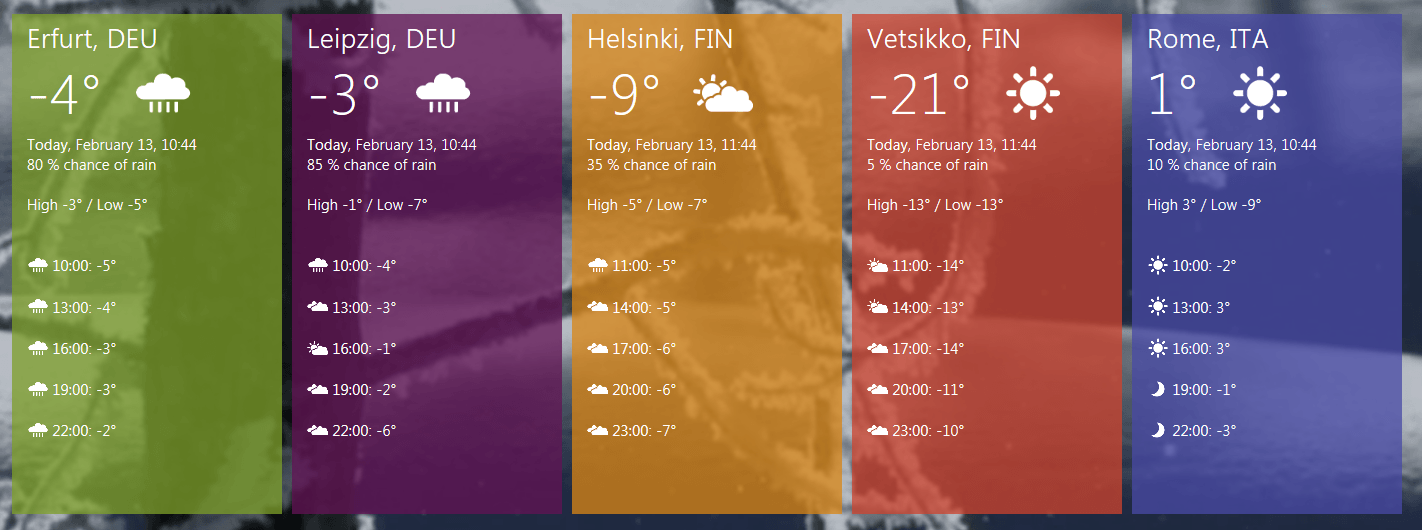
Settings are correct in data.js at C:\Program Files\Applications\microsoft.weather_1.0.0.26_neutral_neutral_8wekyb3d8bbwe\js:
BTW, every now and then when PC booted the weather gadget shows location Anaheim, California (default?). Clicking the gadget immediately reverts to my locations.
I have Dev Prev installed on two rigs, this happens on both.
Any ideas?
Kari
This is what I can see when booted:
That temperature is in Fahrenheit.
I click the Metro gadget to enter Weather, and system immediately changes to Celsius, showing my locations:
Settings are correct in data.js at C:\Program Files\Applications\microsoft.weather_1.0.0.26_neutral_neutral_8wekyb3d8bbwe\js:
convertDataTemperature: function (toCelsius) { for (var _city in Weather.Data.cities) {
["temperature", "feelslike", "high", "low"].forEach(function (value, index) {
Weather.Data.cities[_city][value] = convertTemp(Weather.Data.cities[_city][value], toCelsius);
});
for (var _day in Weather.Data.cityData[_city].forecast) {
Weather.Data.cityData[_city].forecast[_day].high = convertTemp(Weather.Data.cityData[_city].forecast[_day].high, toCelsius);
Weather.Data.cityData[_city].forecast[_day].low = convertTemp(Weather.Data.cityData[_city].forecast[_day].low, toCelsius);
}
for (var _hour in Weather.Data.cityData[_city].hourly) {
Weather.Data.cityData[_city].hourly[_hour].temp = convertTemp(Weather.Data.cityData[_city].hourly[_hour].temp, toCelsius);
BTW, every now and then when PC booted the weather gadget shows location Anaheim, California (default?). Clicking the gadget immediately reverts to my locations.
I have Dev Prev installed on two rigs, this happens on both.
Any ideas?
Kari
My Computer
System One
-
- OS
- Windows 8.1 Pro with Media Center
- Computer type
- Laptop
- System Manufacturer/Model
- HP ENVY 17-1150eg
- CPU
- 1.6 GHz Intel Core i7-720QM Processor
- Memory
- 6 GB
- Graphics Card(s)
- ATI Mobility Radeon HD 5850 Graphics
- Sound Card
- Beats sound system with integrated subwoofer
- Monitor(s) Displays
- 17" laptop display, 22" LED and 32" Full HD TV through HDMI
- Screen Resolution
- 1600*900 (1), 1920*1080 (2&3)
- Hard Drives
- Internal: 2 x 500 GB SATA Hard Disk Drive 7200 rpm
External: 2TB for backups, 3TB USB3 network drive for media
- Cooling
- As Envy runs a bit warm, I have it on a Cooler Master pad
- Keyboard
- Logitech diNovo Media Desktop Laser (bluetooth)
- Mouse
- Logitech MX1000 Laser (Bluetooth)
- Internet Speed
- 50 MB VDSL
- Browser
- Maxthon 3.5.2., IE11
- Antivirus
- Windows Defender 4.3.9431.0
- Other Info
- Windows in English, additional user accounts in Finnish, German and Swedish.


