
Daniel DC88
Banned

- Messages
- 20
- Location
- England
Hi Guys,
I've been noticing some strange things with Windows 8 Pro 64-bit on my new laptop. Certain graphics and icons have been rendering oddly. It looks just like an image does on Photoshop when transforming it. Lines appear jagged and look as though the system isn't bothering to smooth them out.
I've noticed this in a few places, for example the graphic on the right of the Dropbox installer and the uTorrent and Steam icons on my desktop.
Here are some examples:
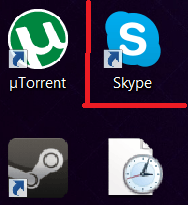
The computer has both Intel HD graphics 4000 and an Nvidia Geforce GTX 680M, which it swtiches between depending on the application (word processing compared to video rendering). The Intel drivers are the ones that are installed by Windows automatically, and the Geforce, the latest stable build.
Any help would be greatly appreciated!
Have a good holiday,
Daniel
I've been noticing some strange things with Windows 8 Pro 64-bit on my new laptop. Certain graphics and icons have been rendering oddly. It looks just like an image does on Photoshop when transforming it. Lines appear jagged and look as though the system isn't bothering to smooth them out.
I've noticed this in a few places, for example the graphic on the right of the Dropbox installer and the uTorrent and Steam icons on my desktop.
Here are some examples:
The computer has both Intel HD graphics 4000 and an Nvidia Geforce GTX 680M, which it swtiches between depending on the application (word processing compared to video rendering). The Intel drivers are the ones that are installed by Windows automatically, and the Geforce, the latest stable build.
Any help would be greatly appreciated!
Have a good holiday,
Daniel
My Computer
System One
-
- OS
- Windows 8.1 Pro 64-bit
- Computer type
- PC/Desktop
- System Manufacturer/Model
- Custom-built
- CPU
- Intel i7 950 Overclocked @ 3.5GHz
- Motherboard
- Asus P58XD-E
- Memory
- 6 x 2GB Corsair XMS 3 @ 1600MHz
- Graphics Card(s)
- Zotak Geforce GTX 590 3GB; Asus GTX 560Ti Direct CUII
- Sound Card
- Integrated Realtek Digital Optical
- Monitor(s) Displays
- Phillips 234EL2; Dell E2209W
- Screen Resolution
- 1920x1080; 1050x1680
- Hard Drives
- Corsair Geforce GS 240GB SSD; Toshiba 3TB HDD
- PSU
- 950W OCZ Game-X-Stream
- Case
- White NZXT Phantom
- Cooling
- Zalman CNPS 9900 Max
- Keyboard
- Corsair K95
- Mouse
- Cyborg R.A.T. 9
- Internet Speed
- 10Mb/S on a good day!
- Browser
- Chrome
- Antivirus
- Windows Smart Screen Filter
- Other Info
- I also have a Scan 3XS LG15 notebook with 16GB RAM, 240GB SSD, 1TB HDD, 2.7GHz 3rd-gen i7, GTX 680M.


