
Windows 8 Forums


Page 1 of 3 123 LastLast
Results 1 to 10 of 22
  1. #1
    whs's Avatar
    whs

    Team Member


    Join Date : Feb 2010
    Germany/Florida
    Posts : 1,260
    Vista and Win7

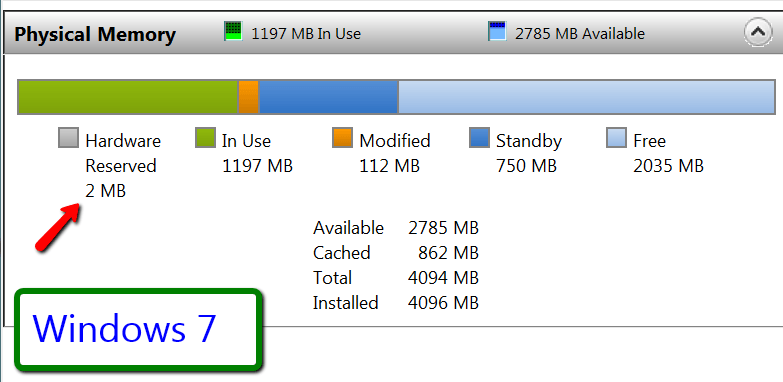
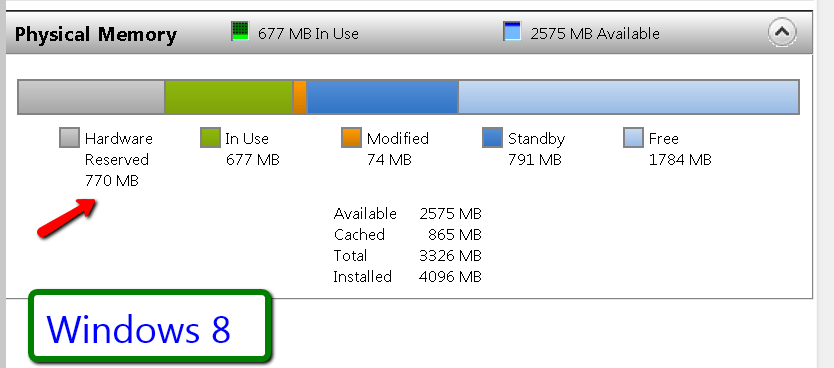
    Interesting observation regarding Hardware reserved


    My Hardware reserved RAM allocation is 2MB in Windows 7 and 770MB in Windows 8 on the same PC. I wonder why.
    Click image for larger versionClick image for larger version
      My System SpecsSystem Spec

  2. #2


    Member

    Join Date : Sep 2011
    Posts : 47
    Windows 7 Ultimate x64 and Windows 8 Consumer Preview
    USA us new york


    Windows 8 must have some significant memory management changes in it, I'd assume. Also does your PC have both integrated graphics and a dedicated card? I'm thinking that that could cause something like that if switching the OS caused it to switch back to the integrated and use your RAM as VRAM.
      My System SpecsSystem Spec

  3. #3
    vrosa's Avatar

    Senior Member


    Join Date : Jan 2011
    Belo Horizonte City
    Posts : 2,466
    Windows 7 SP1 x64, Windows 8 CP x64, Windows 8 Server CP
    Brazil au west australia 2


    It's at least curious !
      My System SpecsSystem Spec

  4. #4
    Avalon's Avatar

    Away for a bit

    Join Date : Oct 2011
    Australia
    Posts : 585
    Windows 8 Dev Preview x64
    Australia uk england


    I think it looks like they are trying to compartmentalize the windows processes a bit more, and have the necessary system processes run in an untouchable RAM partition. That would make sense, considering what they want to do with UEFI boot.
      My System SpecsSystem Spec

  5. #5
    whs's Avatar
    whs

    Team Member


    Join Date : Feb 2010
    Germany/Florida
    Posts : 1,260
    Vista and Win7


    I have an ATI Radeon HD 2400 Pro graphics card with it's own RAM. So it could not come from there.
      My System SpecsSystem Spec

  6. #6
    Avalon's Avatar

    Away for a bit

    Join Date : Oct 2011
    Australia
    Posts : 585
    Windows 8 Dev Preview x64
    Australia uk england


    Quote Originally Posted by whs View Post
    I have an ATI Radeon HD 2400 Pro graphics card with it's own RAM. So it could not come from there.
    That makes me all the more convinced that Microsoft are trying to reduce system RAM usage by having fixed process speeds (at least for the system processes).
    Did you run both examinations at idle, with only Windows processes running?
      My System SpecsSystem Spec

  7. #7
    whs's Avatar
    whs

    Team Member


    Join Date : Feb 2010
    Germany/Florida
    Posts : 1,260
    Vista and Win7


    Did you run both examinations at idle, with only Windows processes running?
    Yeah, only the snipping tool was active.
      My System SpecsSystem Spec

  8. #8
    Avalon's Avatar

    Away for a bit

    Join Date : Oct 2011
    Australia
    Posts : 585
    Windows 8 Dev Preview x64
    Australia uk england


    Quote Originally Posted by whs View Post
    Yeah, only the snipping tool was active.
    It's weird then that 8 was using more. I'd've expected it to use less.
    Edit: Are you using W8 32bit? Says you've only got 3.3GB available to W8.
      My System SpecsSystem Spec

  9. #9
    whs's Avatar
    whs

    Team Member


    Join Date : Feb 2010
    Germany/Florida
    Posts : 1,260
    Vista and Win7


    Yes, W8 32bit. But you got a point here. It may be using the address space for the GPU, etc.
      My System SpecsSystem Spec

  10. #10
    Avalon's Avatar

    Away for a bit

    Join Date : Oct 2011
    Australia
    Posts : 585
    Windows 8 Dev Preview x64
    Australia uk england


    Ah, okay, that explains the skewed graph then. It appeared as though 8 was using more, when in fact it's using almost half as much.
    Do you think you'd be able to get another shot with the 64 bit version? I wonder if there'd be a significant difference.
      My System SpecsSystem Spec

Page 1 of 3 123 LastLast